













Obby: Keyboard Run +1 Speed
- Rating
- Not rated yet
- Played
- 1
- Developer
- Anew Studio
- Category
- Arcade
- Released
- 2026
- Last Updated
- November 08, 2026
- Technology
- HTML5
- Platforms
- Browser (desktop, mobile, tablet)
About Obby: Keyboard Run +1 Speed
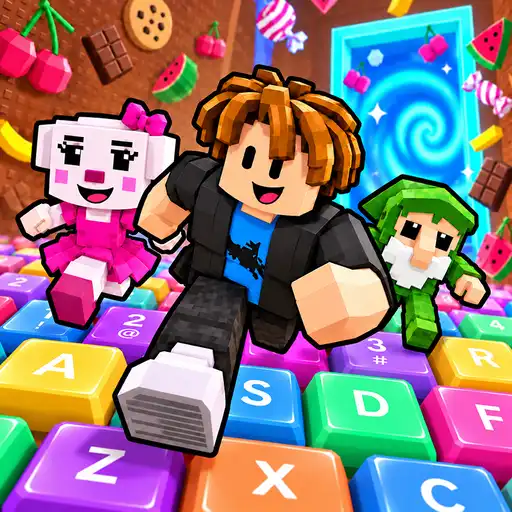
Obby: Keyboard Run +1 Speed is a 3D obstacle course game where you sprint across a track built entirely from oversized keyboard keys. Every key you step on adds to your speed, turning each run into a fast-paced test of timing and agility. Your goal is simple: navigate the course without falling off and reach the trophy waiting at the finish line.
How the Course Works
The tracks are designed around momentum. As you move forward, your character gradually accelerates. This means early jumps feel manageable, but later sections demand quicker reflexes. The environment is rendered in full 3D, giving you a clear view of upcoming platforms and gaps. You will need to read the layout ahead of time because once your speed builds up, hesitation usually means a fall.
If you enjoy blocky 3D worlds and parkour-style movement, you might also like exploring Bloxd.io, which offers a different take on navigating voxel environments. For players who prefer racing with speed upgrades rather than running on foot, SUPER CAR EXTREME CAR DRIVING delivers that same sense of acceleration in a vehicle format.
Progression and Upgrades
Completing courses earns you wins, which function as the main progression currency. You can spend these wins on upgrades that improve your base stats or unlock new advantages for future runs. There is also a daily leaderboard where you can compare your score against other players, adding a competitive layer to the experience.
The game supports both landscape and portrait orientations, making it practical whether you play on a desktop browser or a mobile device. Developed by Anew Studio, Obby: Keyboard Run +1 Speed focuses on short, repeatable runs that reward practice. Each attempt helps you memorize platform spacing and refine your jump timing.
Players who like casual skill challenges with a quirky visual theme will find plenty to appreciate here. The keyboard-key aesthetic gives the courses a distinct look compared to standard obby games. If you want something equally lighthearted but focused on merging mechanics instead of running, Bee Swarm offers another relaxing browser experience worth trying between runs.
How to Play Obby: Keyboard Run +1 Speed
Start a run and move your character forward along the keyboard-key platforms. Your speed increases with every key you land on, so keep moving to build momentum toward the finish line.
Time your jumps carefully to cross gaps between keys. If you miss a platform or hesitate too long at high speed, you will fall and need to restart the course.
Reach the trophy at the end to complete the level and earn wins. Use your accumulated wins to purchase upgrades that make future runs easier, then check the daily leaderboard to see how your score ranks against other players.
Obby: Keyboard Run +1 Speed Controls
- Arrow keys / WASD — move
- Space — jump
- Mouse click — interact with menus
Features
- 3D obstacle courses built from giant keyboard keys
- Speed increases with every platform landed on
- Win-based upgrade system for progression
- Daily leaderboard with global rankings
- Supports both portrait and landscape orientations
- Playable on desktop, Android, and iOS browsers
Tips and Tricks
- Watch the platforms ahead before jumping so you can plan your route at higher speeds.
- Do not stop moving once you build momentum, as restarting your speed costs valuable time.
- Spend your first few wins on basic speed upgrades to make early courses more forgiving.
- Practice the timing on shorter courses before attempting longer tracks with tighter gaps.
- Check the daily leaderboard regularly to set realistic score targets for improvement.
More Games Like Obby: Keyboard Run +1 Speed
FAQ
Yes, the game is completely free to play directly in your web browser with no downloads or purchases required.
Yes, it works on Android and iOS devices as well as desktop browsers. It supports both portrait and landscape screen orientations.
The game is single-player, but it features a daily leaderboard where you can compare your scores with other players worldwide.
Your speed increases automatically as you step on each keyboard key during a run. You can also use earned wins to buy permanent speed upgrades between runs.
You can play immediately without an account, though logging in may allow you to save your progress and leaderboard standing.